- Last update:
Tips for ImageMagick
Tip: iterate over multiple images
mkdir -p output
for f in *.jpg; do
    exiftool -all= --icc_profile:all $f -o "${f%.*}_sdr.jpg"
    # convert "${f%.*}_sdr.jpg" ... "output/${f%.*}output.jpg"
    echo "$f done"
    rm -f "${f%.*}_sdr.jpg"
    sleep 1
done
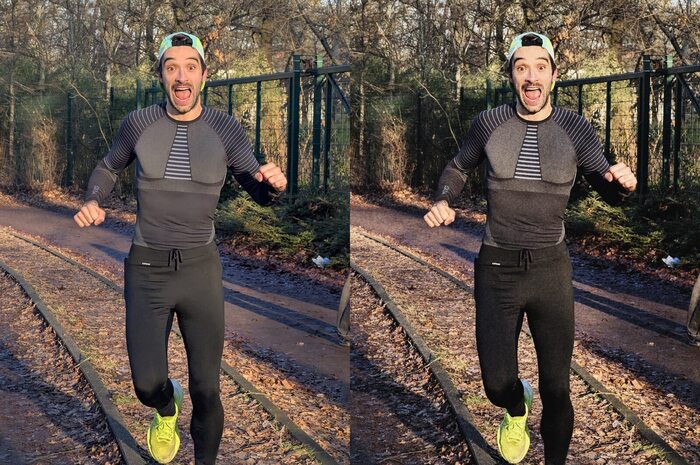
Add grain and a analog-like effect
convert input.jpg \
   -colorspace sRGB -auto-level \
   -gamma 1.18 \
   -sigmoidal-contrast 4x55% \
   -channel R -gamma 1.03 -channel B -gamma 0.97 +channel \
   \( +clone -fill gray -colorspace gray +noise Poisson \
   -attenuate 2.8 -blur 0x0.7 \) \
   -compose softlight -composite \
   +level 4% output.jpg
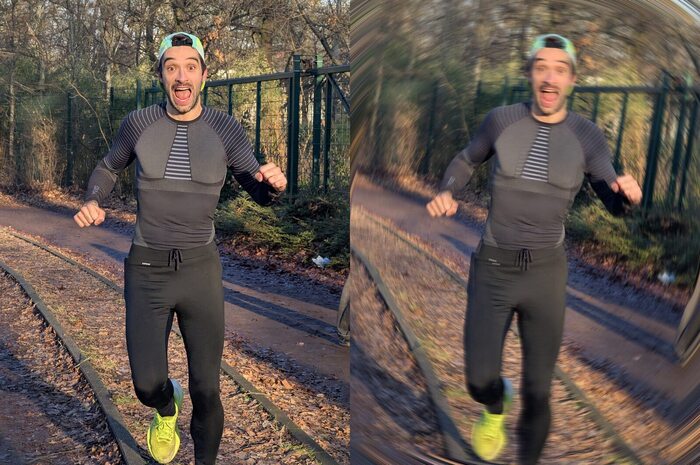
Spin effect
magick input.jpg -resize 800x -write mpr:orig +delete \
   \( mpr:orig -alpha set -virtual-pixel transparent \
   -duplicate 25 \
   -distort SRT "%[fx:w/2],%[fx:h/2] 1 %[fx:t*0.3] %[fx:w/2],%[fx:h/2]" \
   -channel A -evaluate multiply '%[fx:1-(t/30)]' +channel \
   -background none -layers flatten -write mpr:spin +delete \) \
   \( mpr:orig -fill white -colorize 100 -fill black \
   -draw "circle %[fx:w/2],%[fx:h/2] %[fx:w/2],%[fx:h*0.4]" \
   -blur 0x60 -write mpr:mask +delete \) \
    mpr:orig mpr:spin mpr:mask -composite output_minimal_spin.jpg
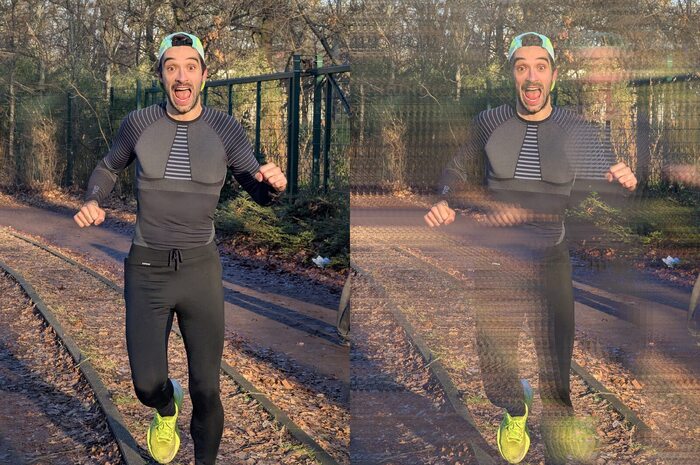
Strobe effect
magick input.jpg -resize 800x -write mpr:orig +delete \
   \( mpr:orig -alpha set -virtual-pixel transparent \
   -duplicate 12 \
   -distort SRT "%[fx:w/2-(t*15)],%[fx:h/2] 1 0 %[fx:w/2],%[fx:h/2]" \
   -channel A -evaluate multiply '%[fx:1-(t/15)]' +channel \
   -background none -layers flatten -write mpr:trail +delete \) \
   mpr:orig mpr:trail -compose Lighten -composite output_strobe_v2.jpg
Place images side by side (like the photos above)
convert image1.jpg image2.jpg +append output.jpg